

We’ve launched the External Asset Transfers dashboard to simplify, digitise and streamline the process of transferring assets via in specie onto HUB24.
Watch our recently recorded webinar for an introduction to the dashboard and walk through of some common in specie transfer scenarios.
Hosted by Lauren Molloy, National Training & Relationship Manager and Leonie McGuire, Training & Relationship Manager WA.
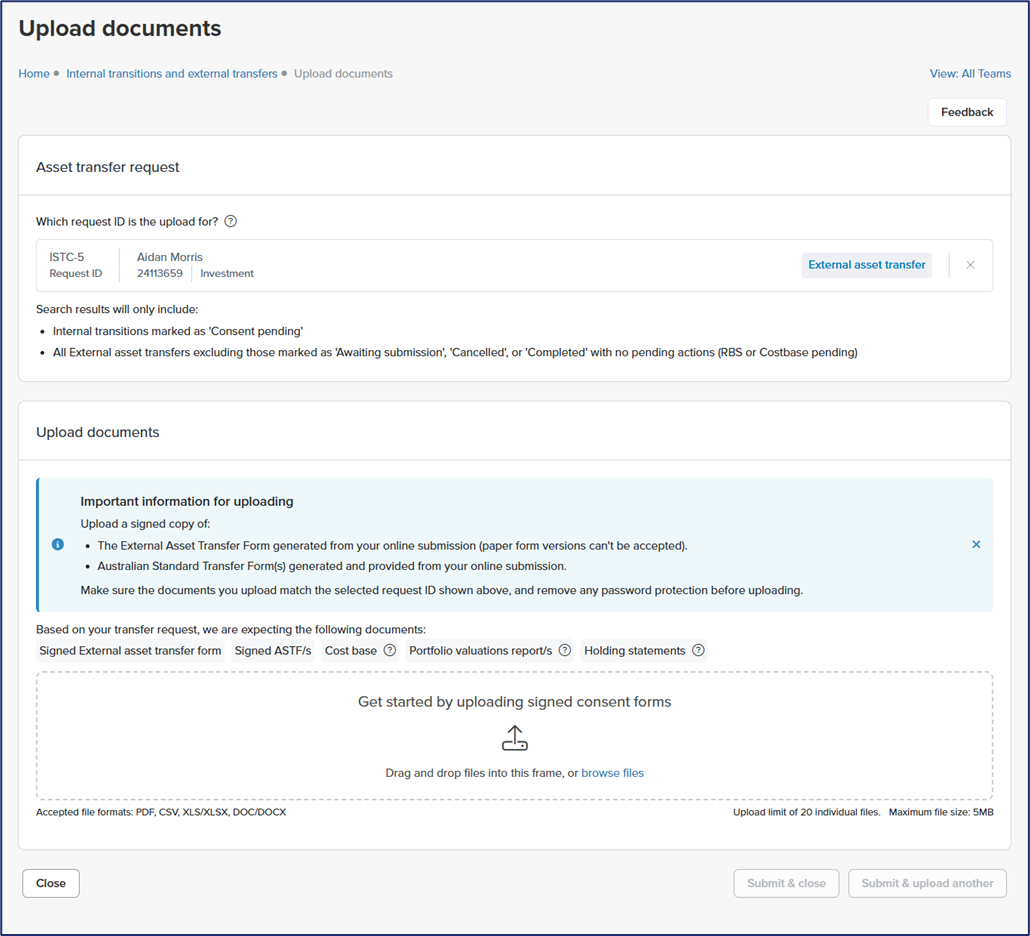
Document Upload Capability
The new document upload capability allows advisers and support staff to securely upload documents directly through AdviserHUB, attaching them to specific Internal Transition or External Asset Transfer requests for streamlined processing. This feature enables users to drag and drop files straight onto the dashboard, eliminating the need for email submissions. Once uploaded, the documents are immediately queued for review by the admin team, with real-time status updates visible to advisers. This not only speeds up the transfer process but also ensures all documentation is managed internally, improving efficiency, transparency, and reducing administrative burden for advisers throughout both external and internal account transitions.
Real-time asset tracking
The External Asset Transfers dashboard now provides dynamic sub-statuses for each asset transfer, giving you clear visibility into exactly where each request sits in the process. Whether assets are with an external provider, with HUB24, with the sub-custodian or awaiting settlement, you’ll be able to track the process.
Streamlined broker transfers
Submitting full transfers are now easier in our new External Asset Transfer online form, with optional asset data entry for the majority of brokers. For CMC and CommSec, asset tables are still required, but for others, you can simply upload a portfolio valuation report, saving you time and effort.
Find out more about the recent enhancements we’ve been making to streamline processes, drive efficiencies and improve transparency for advisers.